

 Follow

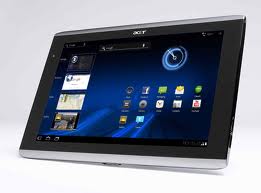
Acer Iconia Tab A500
The Acer Iconia Tab A500 and A501 is a tablet PC that has been designed to provide rich multimedia, gaming and internet browsing experiences and comes finished in a with a brushed aluminium case.
The Iconia Tab has s user-friendly of the 10.1” multi-touch screen that uses the Android operating system. The version used is the Honeycomb version also known as 3.0.
With this tab you can use Social Jogger, Acer’s ultra-social application that shows live updates from your Facebook, YouTube and Flickr contacts on the same page, allowing you to follow, comment and share content with your friends from the one screen.
The difference between the A500 and A501 tablet the 3G in the A501. Both of these models come in 16GB or 32GB models. The 3G connectivity of the A501 is a bonus for ‘road warriors as you are able to keep surfing the internet pretty much no matter where you are.
A 1GHZ Nvidia Tegra 2 T250 processor along with 1GB of RAM provide 1,280 x 800 pixel screen resolution on the Iconia Tab’s 10.1 inch capacitive touch screen.
The screen has a 16:10 aspect ratio, enabling you to watch HD movies at full widescreen screen mode without the black top and bottom bars. The Iconia Tab comes with a good set of stereo speakers that along with the HD video give this tablet a potent multimedia array.
The Acer Iconia TAB A501 comes with a large selection of expansion ports. This includes a full-sized USB 2.0 port, a Micro USB 2.0 port and a Micro HDMI port for streaming video to TV. A 5MP back facing camera and a 2MP front facing camera, 802.11 b/g/n Wi-Fi and with Bluetooth 2.1. Also don’t forget the microsd memory card slot for increased storage capacity in the 16GB model.
The A501 having 3g connectivity will accept a SIM card that is either post paid (ie on a plan) or prepaid. To connect the A500 to the internet while you’re out and about grab a portable WiFi hotspot from your favourite Telco and connect your A500 via Wifi.
Acer Iconia Tab A500 and A501 Accessories
The Acer Iconia Tab A500 and A501: A Friendly Look Back
If you’re curious about these classic 10.1-inch Android tablets from 2011, you’ve come to the right place. The A500 and A501 are nearly twins, same design, same core hardware, with one key difference: how they connect to the internet. Let’s break it down in a simple, helpful way.
What You Get With Both Models
Here’s the shared hardware that makes these tablets tick:
- Display: A 10.1-inch TFT LCD screen with a crisp 1280 x 800 resolution, protected by Gorilla Glass.
- Processor: A dual-core 1.0 GHz Cortex-A9 CPU, powered by the Nvidia Tegra 2 T20 chipset.
- Memory & Storage: 1 GB of RAM, plus your choice of 16GB, 32GB, or 64GB of built-in storage. Need more space? There’s a microSD card slot for that.
- Cameras: A 5 MP rear camera with autofocus and an LED flash, plus a 2 MP front-facing camera for video calls.
- Operating System: These shipped with Android 3.0 Honeycomb and could be upgraded to Android 3.2. The A500 also got an official update to Android 4.0 Ice Cream Sandwich.
The Big Difference: A500 vs. A501
- Acer Iconia Tab A500: This is the Wi-Fi-only model. Perfect if you’re mostly at home or near a hotspot.
- Acer Iconia Tab A501: This one adds mobile broadband (3G/4G HSPA+) through a SIM card slot. It’s slightly heavier because of the extra cellular hardware, a small trade-off for on-the-go internet.
Ports and Connections
Both tablets come well-equipped for their time:
- A full-size USB host port (so you can plug in flash drives or other accessories)
- A micro-USB port (mainly for data transfer and host mode, not charging). Use a micro-USB cable, not a newer USB-C cable.
- A micro-HDMI output for connecting to a TV or monitor
- A standard 3.5mm headphone jack
How to Charge the A500 and A501
Charging these tablets is a bit specific, so here’s what you need to know:
- Power Adapter: A dedicated 12V 1.5A (18W) adapter is required.
- Connector: It uses a proprietary DC barrel plug, 3.0mm outer diameter and 1.1mm inner diameter.
- Charging Port: Look for the round DC-in jack on the side of the tablet. Important: the micro-USB port is not for wall charging on these legacy models. It’s meant for data and host mode, so don’t rely on it to power up your device.
When Were They Discontinued?
Acer never announced an official end-of-life date for the A500 or A501, but here’s the general timeline:
- Acer Iconia Tab A500: Released in April 2011 as the Wi-Fi version.
- Acer Iconia Tab A501: Arrived mid-2011, with carrier variants rolling out in September 2011.
Discontinuation: They were quietly phased out around 2012–2013 as Acer moved on to newer models like the A510 and the A200/A210 series. Official manufacturer support ended shortly after that, so if you’re using one today, you’re on your own for software updates but the hardware can still be fun to tinker with.

Latest posts by The Campad Team (see all)
- Apple Launches iPhone 16e - February 21, 2025
- Create a Wireless Charging Surface at Home for Less Than $50 - July 9, 2024
- Meet The Telstra 5G Hotspot - May 22, 2024